Inspect and test Statsig feature flags directly in your browser
The Statsig Browser Extension, from Statsig, is a developer-focused tool for verifying feature flags and experiments in real time on desktop Chromium browsers. It surfaces the SDK state on the current page, provides local override controls, and links back to console entries so teams avoid digging through logs. Key capabilities include SDK inspection, environment switching, and event debugging. Developers, QA engineers, and product managers gain faster, browser-based verification without editing production code.
Shows on-page SDK state and links to console entries for quick validation
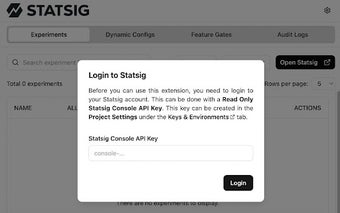
The extension detects a Statsig SDK instance on a page and exposes the active gates and experiment assignments in the popup, so you can confirm what the client sees. The interface includes direct navigation to the matching flag or experiment in the Statsig console, which reduces time spent matching client state to server-side configuration. Visual cues on the toolbar icon indicate whether the SDK was found.
Makes targeted testing simpler with local overrides and attribute inspection
Local override controls let testers force specific variants and gate states for troubleshooting without code changes. Overrides apply only to the local browser session, so other users are unaffected. The tool also displays the user properties and environment attributes passed to the SDK, helping QA and product staff validate audience targeting and variant eligibility before wider rollout.
Built for desktop Chromium workflows and integrated Statsig projects
The extension runs on Chrome and other Chromium-based desktop browsers and supports multiple project environments and configurations, matching typical staging and production setups. It requires an active Statsig project to operate, which makes it most useful for teams already invested in the Statsig platform. Developer feedback notes the extension reduces manual checks during experiment debugging.
Practical choice for Statsig-integrated teams who need faster verification
The extension serves as a practical workflow enhancer for teams that rely on the Statsig platform, shortening the path between a browser-observed issue and a console investigation. As a practical tip, use a separate browser profile for testing so local overrides stay isolated from daily browsing. The tool is focused in scope, so its value depends on existing use of the Statsig SDK.
Pros
Local overrides affect only your browser session
Direct links to the matching Statsig console entries
Displays user properties and environment attributes
Supports multiple project environments and configurations
Cons
Desktop Chromium only, not available on mobile browsers
Laws concerning the use of this software vary from country to country. We do not encourage or condone the use of this program if it is in violation of these laws. Softonic may receive a referral fee if you click or buy any of the products featured here.